
Wednesday, November 4, 2009
HP Laptops for $298!
As I was glancing through my alerts for HP, I ran across and article from the LA Times.
"For one week starting Saturday, Wal-Mart stores will hold an electronics savings event which includes an HP laptop with 3GB of memory for $298; a Sharp 52-inch flat-panel television for $898 and a Sony Blu-ray player for $148."
I may have to get me one of each!!!!
=Cheers=-

Tuesday, November 3, 2009
Panasonic Launches New MFP "Panasonic DP-MB350"

Panasonic launched a new desktop b/w A4 MFP, called the DP-MB350 offering:
- 35ppm top speed in b/w only
- Can scan in color or b/w up to 9600dpi
- Scans in TIFF, PDF or JPEG formats
- Scan to email/TWAIN/PC/FTP
- Copy/print/scan/fax right out of box (PCL print driver only with 128MB RAM)
- 3.6” full color LCD control panel
- first copy out time of 15 seconds
- 10/100BaseT and USB ports standard
- Provides incoming fax previews
- Junk fax filter
- Fax forward to email, PC or FTP
- 50 sheet document feeder
- Auto duplex standard up to 24lb. bond
- OPC drum cartridge yield of 20,000 pages
- Toner cartridge yield of 8,000 pages based on 5% coverage per page
- 1200x1200dpi printing (interpolated to 2400dpi)
- Comes standard with 520 sheet paper drawer (legal size maximum, up to 44lb. bond)
- Can add second 520 sheet drawer
- Has Quick ID Copy function for copying insurance cards or drivers licenses
- Comes with READiris Pro 7.0 OCR software
- Base MSRP of $1995.00
-=Cheers=-
Monday, November 2, 2009
Xerox 5135 & 5150 "Spec Review"
 - Xerox now shipping to new A3 b/w copiers, the WorkCentre 5135 and 5150 featuring:
- 35ppm and 50ppm top speeds respectively
- Actually made by Fuji of Japan
- Replaces the WorkCentre 5030 and 5050 models
- 36,500 page yield toner cartridge (based on 6% coverage per page)
- 125K/month and 200K/month maximum duty cycles
- Base MSRPs of $5499 and $10,999
- Optional print/scan controllers
- Optional fax boards
- Advertised as being manufactured using reused components from previous model copiers
- Optional searchable PDF (OCR)
- Document feeder holds up to 75 originals
- Top scan speed of 85ipm
- 600x600dpi
- 1,100 sheet paper capacity standard (two 500 sheet drawers and 100 sheet stack bypass)
- Maximum paper capacity with options of 4,700 sheets
- Auto duplex standard
- Optional finishers offer hole-punch and stapling
- Do not support the EIP embedded solution platform
Thursday, October 29, 2009
Monday, October 26, 2009
OKI Printing Solutions Expands MFP Portfolio with Affordable Devices
 Okidata now shipping three new desktop b/w A4 MFPs,the MB460, MB470 and MB480 offering:- 297MHz processor
- 30ppm top speed when printing, 22ppm when copying
- MB460 offers 600dpi
- MB470 & MB480 offer 1200dpi
- USB & 10/100BaseT ports
- PCL & PS print drivers on MB470 & MB480
- MB460 only offers PCL print driver
- 50 sheet document feeder
- 64MB RAM standard (up to 256MB with options)
- MB460 offers 250 sheet drawer and single sheet bypass
- MB470 offers 250 sheet drawer and 50 sheet bypass
- MB480 offers two paper drawers and 50 sheet bypass
-=Cheers=-
Xerox WorkCentre 7425, 7428, 7435 "Spec Review"
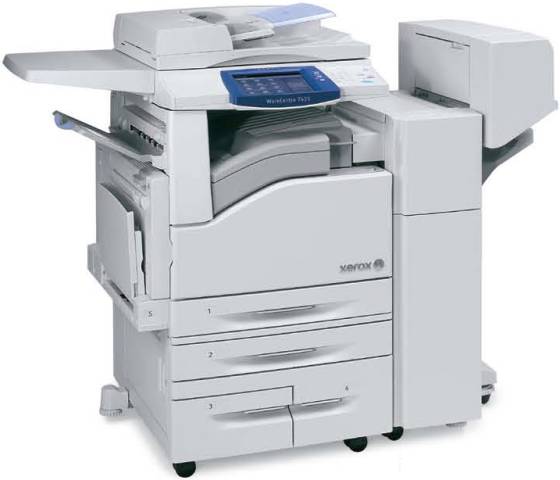 Xerox now shipping 4 new mid-range color MFPs, the WorkCentre 7425, 7428, 7435 offering: replaces the 7325, 7335, 7345 & 7346
- actually made by Fuji of Japan
- 4 tandem OPC drum design
- Polymerized toner, called Xerox Emulsion Aggregate (EA)
- 7425 offers 20ppm color and 25ppm b/w
- 7428 offers 28ppm b/w or color
- 7435 offers 35ppm b/w or color
- optional fax board (only 400dpi)
- first copy out time as fast as 5 seconds for b/w, 6.4 seconds for color
- Duty cycles of 60K/mo, 80K/mo & 105K/mo respectively
- Base MSRPs of $10,499, $11,599 & $13,499 respectively
- Scanning is OPTIONAL and does not come standard with print controller
- 75 sheet document feeder
- Maximum scan speed of 54opm
- 1200x1200dpi (interpolated to 2400dpi)(2/4 selectable bit depth)
- 600x600dpi when copying or scanning
- Built-in print controller offers 667MHz processor
- PCL & PS print drivers come standard
- 1.5GB RAM and only a 40GB hard drive
- Comes standard with bypass and only one paper drawer
- Up to 256gsm paper handling in bypass or drawers
- Up to 12”x18” paper in bypass
- Maximum paper capacity with options of 5,140 sheets
- Can replace drawer 1 with a 60 envelope feeder
- auto duplex standard
- Optional Bates stamping
- 30 second warmup time from sleep mode (longer if turned off)
- gloss mode
- Optional EIP for embedded applications
- Optional SD card reader (print from digital camera memory sticks)
- Optional scan to searchable PDF (OCR board)
- Optional USB port for scan/print from thumb drive
- Optional thumbnail preview for jobs on hard drive
- Optional EFI Fiery print server with 1.86GHz processor and 80GB hard drive
- Optional internal stapling finisher
- Optional external finisher with stapling, hole-punching & booklet making
-=Cheers=-
Saturday, October 24, 2009
Lexmark Celebrates 20th Anniversary
 - Lexmark recently celebrated the 20th anniversary of the launch of their first desktop b/w laser printer. Here is a quick history:
- Lexmark was formed in 1991, when IBM sold off its imaging division to investors
- The name Lexmark came from the fact that IBM had a facility in Lexington, Kentucky that made devices that put marks on paper.
- Current Lexmark, CEO, Paul Curlander, was the product manager for
computer printers
- The division originally focused on making typewriters (Selectric, WheelWriter, etc.)
- In 1981, IBM launched the IBM PC and a dot matrix printer
- In 1969, Gary Starkweather invented first laser printer at Xerox PARC.
- In 1971, Xerox produced first laser printer.
- In 1976, IBM installed its first laser printer, the 3800, a huge floor model, at
F. W. Woolworth’s data center in Milwaukee, WI. Many of these high speed models are still in use today
- In 1984, Hewlett Packard launched the first Laserjet, which was a Canon-made
8ppm model, 300x300dpi, which weighed 75lbs.
- 1985, first IBM laser printer was a table top model, the 3812, selling for $7000 each, and was developed in Boulder, Colorado.
- In 1988, HP launched the first DeskJet inkjet printer.
- Paul Curlander and team of 100 in Lexington, KY were tasked with making small, lightweight, desktop model, which became the IBM 4019 featuring:
- First model able to print on envelopes
- First model to print pages in order
- First test print made at 5:09pm on 4/14/1987 by Harry Cooper
- On 5/6/1987, test unit was printing pages with text and pictures
- Approved for production by Marvin Mann, the first Lexmark CEO
- Original selling price of $2600.00
- Launch date of 10/10/1989
- Sold 100,000 in first year
- Won Product of the Year by PC Magazine
- Toner cartridges are still made and sold for the 4019
- On 10/24/1994, Lexmark launched the Optra series, its first non-IBM labeled printers
- Lexmark announced it signed a 4 year, multi-million dollar managed print services contract with Kingfisher, a global home improvement retail group. The deal includes install of new b/w and color laser MFPs/printers at 330 stores.
-=Cheers=-
Tuesday, October 20, 2009
Fujitsu SnapScan fi-6010N "Spec Review"

Fujitsu now shipping the SnapScan fi-6010N desktop scanner featuring:
- large 8.4” color LCD touch screen (like a digital copier)
- scan to email
- scan to folder
- scan to network fax
- scan to FTP
- scan to network printer
- full 101 keyboard
- user can preview, zoom, pan and rotate scanned images
- open source integration capabilities for embedded solutions
- optional software developer kit (SDK)
- 25opm in b/w or color
- Duplex mode scans at 50ipm
- Auto rotate
- Blank page deletion
- Color detection
- Deskew and despeckle
- Page size detection
- Ultrasonic double feed detection
- 50 page document feeder that can handle embossed cards
- Base MSRP of $2999
-=Cheers=-
Monday, October 19, 2009
Print Audit 6 Now Available for Macintosh OS X
 Print Audit 6 Now Available for Macintosh OS X
The Apple version of Print Audit 6 will provide OS X users around the world with a comprehensive suite of print management solutions
CALGARY, ALBERTA (October 19, 2009) – Continuing its longstanding dedication to the ease of use and compatibility of their print management products, Print Audit has released a new version of their flagship product, Print Audit 6, for the Macintosh operating system.
With Apple computers and OS X gaining significant popularity in office environments over the past five years, the leading print management company has provided Mac users with a version of their award winning software that offers all of the features and benefits of the Windows version of the product.
“Market data and our own customer feedback shows that Apple products are becoming increasingly common in the workplace, particularly in the educational and creative spheres,” said John MacInnes, President and CEO of Print Audit. “For this reason, releasing a Mac OS X version of Print Audit 6 was a natural step that will allow even more organizations to accurately manage their printing and decrease associated costs.”
Print Audit 6 for Mac contains the same features as the Windows version of the software. The solution is comprised of three components called Analysis, Rules, and Recovery which work together to help organizations to save money, increase efficiency, and reduce their environmental impact.
Print Audit 6 for Mac is compatible with all Macintosh computers running OS X 10.4 or higher.
To learn more about Print Audit, please visit www.printaudit.com.
About Print Audit
Established in 1999 and headquartered in Calgary, Alberta, Print Audit is the fastest growing print management company in the world. By providing businesses with innovative and practical print management software solutions, the company has helped customers recapture over $150 million in printing and photocopying expenses while saving an estimated 190,000 trees a year. Print Audit has offices located in the United Kingdom, South Africa, Australia, Brazil, Canada and the United States.
For more information on Print Audit, please contact:
Angela Onstine
1.877.412.8348
pr@printaudit.com
www.printaudit.com
Outside of North America, please contact:
Print Audit - Europe
+44(0)1483 726206
www.printauditeurope.com
inquiry@printauditeurope.com
Print Audit - Australasia
+612 9922-3756
http://www.printauditaustralasia.com
Print Audit - South Africa
+086 110 5777 (Within South Africa)
+27 11 531 1869 (Outside South Africa)
www.printauditsa.com
info@printauditsa.com
Print Audit – America Latina
+55(21)2220 0939
www.printaudit.com.br
Informações em Português:
suporte@printaudit.com.br
Informaciones en Español:
espanol@printaudit.com.br
-=cheers=-
Saturday, October 17, 2009
How much of your office copying/printing is in color?

Would like everyone's input on this, this poll is for end users of MFPs, MFDs, and other printing equipment for the office.
How much of your office copying/printing is in color?
Please click this link for the Poll:
How much of your office copying/printing is in color?
-=Cheers=-
Subscribe to:
Posts (Atom)